How to Apply for a New Connection with FESCO?

Applying for a new FESCO electricity connection is very simple. You only need a few documents to complete the process.
I have recently applied for a new FESCO meter myself. In this guide, I will share my personal experience to help you.
I have explained the full procedure in easy steps. Anyone can follow them without confusion. I have also added a list of all the required documents. You can use this guide to apply for a new electricity connection or meter.
Key Points:
- 📝 You can apply for a FESCO meter online or offline.
- 📥 PDF form is available for download.
- 🆔 CNIC, address proof, and load form are required.
- 🏢 Commercial users need NTN and business documents.
- 🔌 FESCO offers 10 types of connections.
- 🧾 Demand notice is issued after approval (Rs. 9,800).
- 🌐 You can track your application online via ENC website.
FESCO New Connection Application Form PDF Download
Click on the download button to get the PDF form online from our website.
What Documents Are Required for FESCO New Connection?
Below is the list of all the required documents for a new FESCO connection.
- Copy of your CNIC
- Proof of home address
- Load demand assessment form
- Your complete address
- First name and last name
- Phone number
Types of FESCO Connections
FESCO offers 10 different types of connections. These connections are specified for each type of usage, like domestic or commercial. Here are the names of all the FESCO connection types.
- Domestic گھریلو
- Commercial کمرشل
- Industrial انڈسٹریل
- Agriculture زرعی
- Tubewell ٹیوب ویل
- Temporary عارضی
- General Services جنرل سروسز
- Electrification (Colonies) الیکٹریفیکیشن (کالونیاں)
- Street Light گلی کی لائٹ
- Corporate Company کمپنی
FESCO New Connection Charges 2025
| Charges | Details |
|---|---|
| Application Fee | Rs. 500 |
| Meter Installation Fee and Labor Charges | Rs. 2,000 – Rs.5,000 |
| Security Deposit | Rs. 3,000 – Rs. 10,000 |
| Miscellaneous Charges | Rs. 500 – Rs. 1,000 |
How to Apply for a FESCO New Connection?
Before you apply for a new connection, you need to check the eligibility criteria for the new meter application. Check it below.
- Attested CNIC Copy of Applicant
- Attested CNIC Copy of Witness
- Property Document Copy
- Neighbour Electricity Bill Copy
- Wiring Contractor`s Test Report
- NTN (for commercial connection)
- Lease Agreement (for commercial connection)
- Business Registration Documents (for commercial connection)
- Load Demand Assessment Form
Apply for a New Connection Meter Online
This is the easiest way to apply for a new electricity meter connection. You need to follow the steps below.
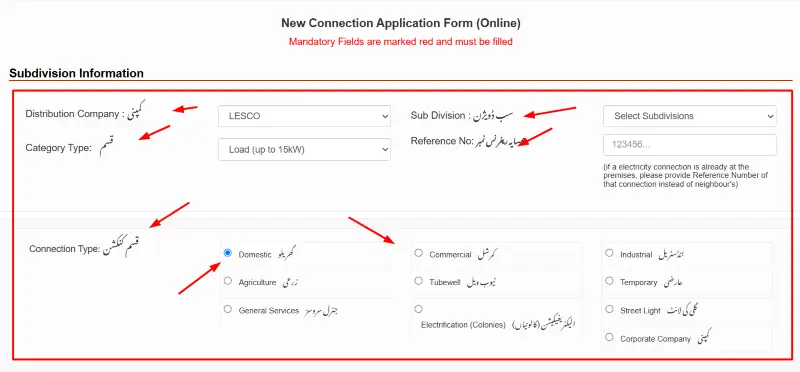
- Visit the new connection application portal at https://enc.com.pk/.
- On this website, click on the “Apply” button on the left side panel.
- Now you will see the application form on the screen that you need to fill out.
- Provide the following details:
- Distribution Company : کمپنی
- Sub Division : سب ڈویژن
- Category Type: قسم
- Reference No: ہمسایہ ریفر نس نمبر
- Connection Type: قسم کنکشن
- Applicant Status:
- Landlord/Owner مالک مکان / Tenant(Rental) کرایہ دار
- Applicant Name: درخواست گزار کا نام
- والد/شوہر کا نام
- Citizenship:
- Pakistani پاکستانی شہری / Foreigner غیر ملکی
- NIC / CNIC: قومی شناختی کارڈ نمبر
- Present Address: موجودہ پتہ
- Mobile No1: 1موبائل نمبر
- Number of meters already installed:
- Minimum Load کم از کم لو ڈ (In KWh):
- Premises Address:
- Once you have filled out all the details, you need to click on the “I Agree” button.
- Now, solve the captcha and submit the application.
- You will receive an SMS once your application is approved.
Apply for a New Meter Via the FESCO Office
If you are not a person who prefers the online method, then you can go to the FESCO office to fill out the form in person. Here are the steps.
- Visit the Nearest FESCO Sub-Division Office
- Go to your nearest FESCO sub-division office during working hours.
- Ask for the New Meter Application Form
- Request the application form for a new electricity connection. This form is free of cost.
- Fill Out the Form with All the Required Details
- Start filling the form carefully. If you don’t understand any part, ask the officer for help. They will guide you.
- Attach the Required Attested Documents
- Once your form is complete, gather and attach all the necessary attested copies. These include your CNIC, property documents, witness CNIC, and other papers.
- Submit the Form and Pay the Fee
- Submit your completed form to the office staff. You will also need to pay the new meter fee, which is around 10,000 PKR.
How to Get a Demand Notice?
Once your new meter application is approved, FESCO will issue a demand notice in your name. You will receive this notice through SMS or from the FESCO office.
The demand notice fee is 9,800 PKR. You need to pay this fee at the bank mentioned on the notice.
After payment, keep the bank receipt safe. FESCO will start the meter installation process once your payment is confirmed.
How to Track New Meter Connection Approval?
Once your application is submitted, it can take up to 30 days to get approval from the FESCO. However, you can track the process online.
- Go to the ENC website.
- Now, click on the “Track” button on the left side menu options.
- You need to select Application Type:
- New Connection
- Change of name/tariff/load
- Choose a new connection option.
- Now choose your company from the drop-down menu, which is FESCO.
- Choose between Tracking ID or CNIC (without dashes).
- Enter the details and click on the “Submit” button.
- Your application status will be shown on the screen.
F.A.Q
How to apply for a new FESCO meter connection online?
You can apply for a new connection using this guide online or offline. Just follow the steps above.
Can I track my connection status?
Yes, you can check your connection status online at the ENC web portal. Just enter your tracking ID or CNIC number to get the real-time status of your application.
How to download the Demand Notice?
You can download the demand notice from the ENC website once your connection is approved by FESCO.