How to Confirm If the FESCO Bill is Paid or Not?

One of the common confusions that many FESCO consumers face is confirming whether their bill has been paid or not. It is very necessary to know if the bill is paid successfully to avoid LP or late payment charges from FESCO. So today, I will provide you with the latest and easiest guide on how to confirm if the FESCO bill is paid or not.
Now, you will never be confused again about the payment of your electricity bill online. Just follow my personally tested and working solution.
To check your latest FESCO bill, please visit our website fescobills.com.pk regularly.
How to Find Out If My FESCO Bill Payment is Successful?
You can use my tested method to find out if the payment is made or not. I have a guide that you can try on JazzCash or EasyPaisa mobile wallet apps. Also, you can use any banking apps to know the payment status.
Follow the simple guide and find out whether your FESCO payment is done or not.
1) Check Bill Payment Status On JazzCash Wallet App
First, I will guide you on how to check your FESCO bill payment status on the JazzCash mobile app. Here are the steps to follow.
- Open your JazzCash mobile app.
- Enter your MPIN and login to your account.
- Now choose the “Bill Payment” option from the homepage.
- You will see different options for bills, so you need to choose “Electricity” from there.
- Here you have to choose your electricity provider company, “FESCO”.
- Enter your 14-digit bill reference number that you can find on your FESCO bill.
- This step is very important. It tells you if your bill is paid or not.
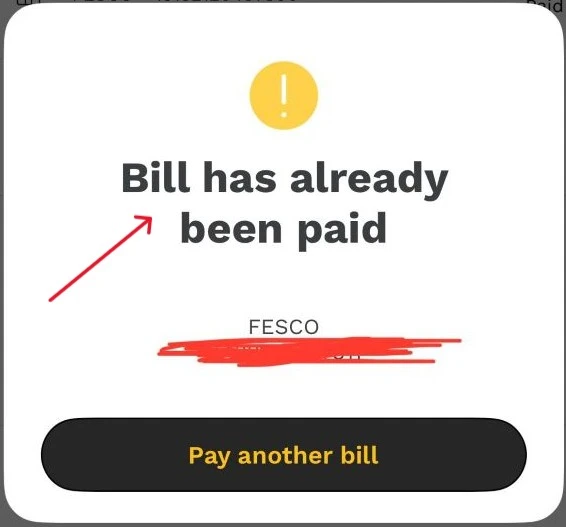
- If your payment was successful, you will see a message saying “Bill is already paid.”
- If the bill is still unpaid, you will see a page asking you to pay the bill amount.
2) FESCO Bill Payment Confirmation Via EasyPaisa Mobile App
Now I will let you know that you can check your bill payment status on the EasyPaisa mobile app.
- Launch your EasyPaisa mobile app.
- Sign in with your phone number and PIN.
- Now go to the “Bill Payments” section.
- Choose “Electricity Bills” from there.
- Now, pick the “FESCO” company as your electricity company.
- Enter your 14-digit reference number.
- You will get two responses from there.
- Response 1: Your bill is already paid.
- Response 2: Please pay your bill.
- So if your bill is already paid, then you will get response 1.
3) FESCO Bill Paid or Not Confirmation on Banking Apps
The last way to check your payment status is to use any banking app. You can choose your banking app and login to your account. Now, follow the same steps as I mentioned above to check if the bill is paid or not.
F.A.Q
How to check if a FESCO bill is paid or not?
You need to use a mobile wallet app like JazzCash or EasyPaisa to pay your bill. If your bill is already paid, you will see a message saying “Bill is already paid.” If not, the app will show you the payment page to complete the process.
What if I have paid my bill twice?
If you paid your bill twice by mistake, don’t worry. FESCO will save the extra amount and adjust it in your next bill.
How to know if your FESCO bill is paid at a bank branch?
When you pay your bill at a bank branch, you will get a receipt. This receipt will have a “Cash Paid” stamp from the bank. This stamp confirms that your bill has been successfully paid.




One Comment