How to Pay the FESCO Bill?

Paying your FESCO bill on the due date is very necessary. To avoid any interruption to WAPDA services, everyone has to pay the FESCO Bijli ka Bill at the right time. But the question that arises here is how to pay the FESCO bill? Well, with my tested and 100% working methods, you can now pay your bill without any issues.
I have been paying the FESCO bill since 2010. I have paid up to 180 FESCO bills without any issues. In this guide, I will let you know how you can pay your FESCO bill in just 2-3 minutes.
Key Points:
- 💳 Pay your FESCO bill in just 2–3 minutes using mobile apps
- 📱 Use JazzCash, EasyPaisa, or bank apps to pay securely online
- 🧾 Enter your 14-digit reference number to fetch your bill instantly
- 🏦 No wallet or bank app? Pay physically at any major bank branch
- ⏰ Can’t pay online after due date, visit bank or mobile shops instead
- ✅ Set up reminders or auto-pay to avoid missing future due dates
How to Pay My FESCO Bill?
You should pay your FESCO bill using the mobile wallets or banking apps online. This is the best, secure, and fastest way to pay the FESCO bill charges. However, those who don’t have these wallets or apps can use the physical method to pay the bill.
Let’s start with the online methods:
Pay FESCO With Mobile Wallets (JazzCash/EasyPaisa/Upaisa)
One of the quickest ways to pay the electricity bill is to use mobile wallets like JazzCash or EasyPaisa. Here is how to use them and pay your bills.
JazzCash Mobile App
JazzCash is Pakistan’s leading mobile wallet, trusted by over 48 million users, with 19.7 million active users every month according to TMForum.
Nearly 40% of Pakistan’s population remains unbanked. JazzCash steps in with a mobile wallet that works just like a bank account, making financial services easy and accessible.
So use this app and pay your FESCO bill online.
1) Open Your JazzCash App
Go to your apps section on your mobile phone and open the JazzCash app. Make sure your JazzCash account has a balance to pay the amount of your bill.
2) Tap on the “Bill Payments” Icon
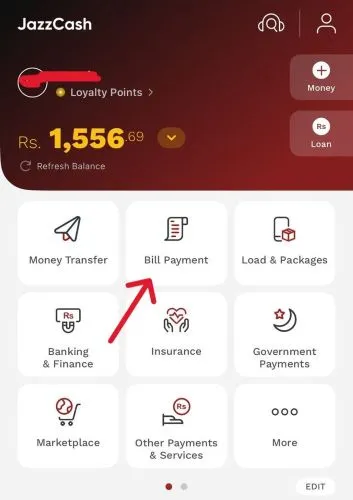
On the homescreen of the app, you will see the “Bill Payments” icon. This will be right below the balance section. So tap on it and it will open a new window.
3) Choose the “Electricity” Option
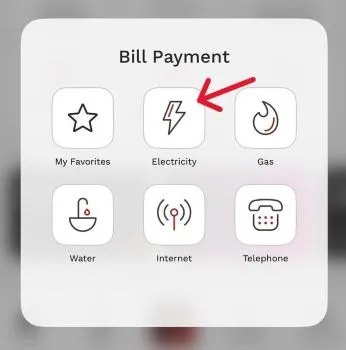
On the next window, you will see different options like Water, Gas, and Telephone. However, you need to choose “Electricity” from the options available there.
4) Pick “FESCO” As Your Electricity Company
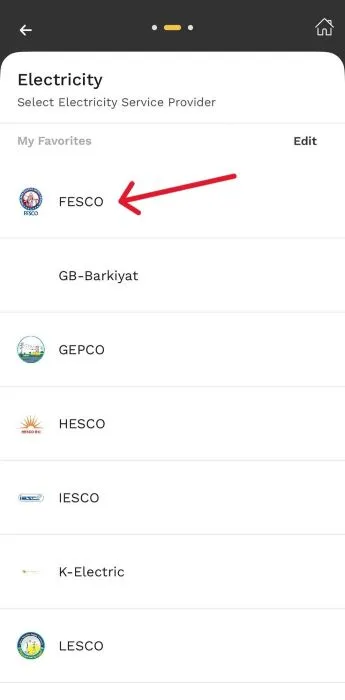
Now, you need to choose your company, which is FESCO. This is the company that you have to choose to pay your bill.
5) Enter Your “14-digit Reference Number” Inside the Blank Box
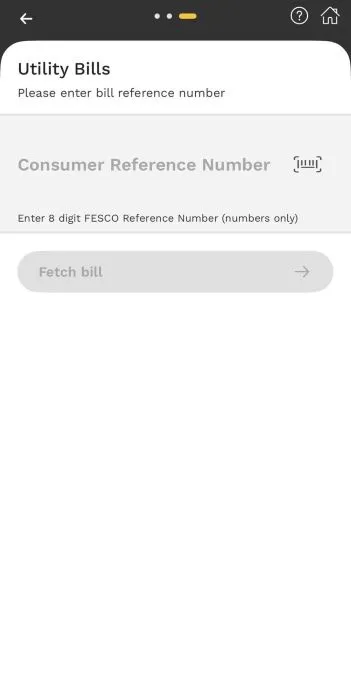
Now, a new screen will appear where you need to enter your 14-digit bill’s reference number inside the blank box. Check your bill and get this reference number from the upper left corner. Type this number and tap on the “Fetch Bill” button.
6) Review Bill Payment
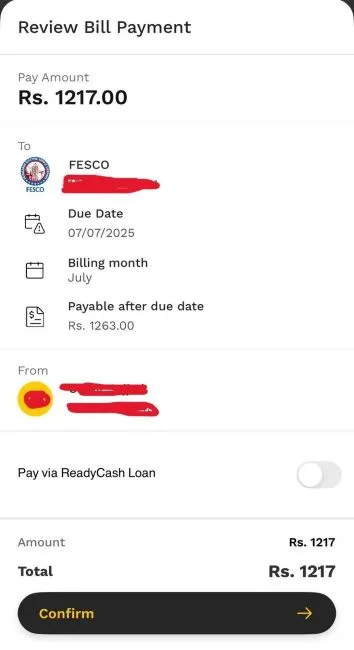
Once your billing details appear on the screen, you need to make sure that you are paying the right bill. Always check your name on the bill and the bill amount before you make a payment.
7) Pay the Bill
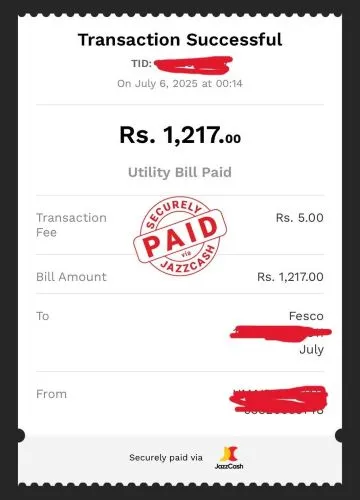
The last step is to tap on the “Confirm” button and enter your PIN to pay the bill. You will see the confirmation screen with the text “Transaction Successful”. It means your bill is now paid. Save this receipt for proof of payment.
Easypaisa Mobile App
Now, let’s find out how to pay the FESCO bill using the EasyPaisa mobile wallet app.
- Open the EasyPaisa mobile app.
- Go to “Bill Payment”.
- Now choose “Electricity”.
- Find your bill company, which is “FESCO”.
- Enter your 14-digit reference number inside the required space.
- Fetch the billing details and amount.
- Now pay the bill and get the receipt.
Pay FESCO Bill Using Banking Apps
You can use any banking app to pay the FESCO bill. All the Pakistani banks are offering the facility to pay the FESCO or any other electricity bill. However, here is an overview of how you can pay your FESCO bills with mobile banking apps.
- Open your preferred bank account app.
- Now, login to your account with a username and password.
- Go to the “Utility Bills” section.
- Choose the “Electricity Bill” option.
- Look for the “FESCO” company name and choose it.
- Enter your 14-digit billing reference number.
- Get your bill payment details and confirm them.
- Pay the amount.
- Get the e-receipt.
How to Pay Your Bijli Ka Bill Without Any Mobile Wallet or Banking App?
If you don’t have a mobile wallet or bank account to pay the FESCO bill, then you can choose the traditional ways to pay the bill. Yes, you need to visit the banks in person to pay your bills. Follow the steps.
- Apna FESCO ka bill uthain aur kisi bhi mashhoor bank ki branch mein chalay jain, jaise HBL, Meezan, UBL, MCB ya Allied Bank.
- Bank mein “Bill Payment” counter par jain.
- Wahan mulazim se kahain ke aap FESCO ka bill jama karwana chahtay hain.
- Wo aap se bill aur paisay (cash) mangay ga.
- Usay dono cheezain dein.
- Bill jama karne ke baad wo aapko ek receipt dega.
Ye receipt sambhal kar rakhain, ye saboot hoti hai ke aap ne bill ada kar diya hai.
How to Pay the FESCO Bill After the Due Date Has Passed?
You can only pay the bill in person if the due date has passed. You can not pay that bill online. So you have to visit any bank branch, or you can visit the EasyPaisa or JazzCash mobile shops and pay your bill there.
F.A.Q
Can I schedule automatic FESCO bill payments every month?
Yes, some banking apps and mobile wallets like JazzCash and EasyPaisa offer auto-payment or reminder options. You can set up monthly bill reminders or schedule payments to avoid missing due dates.
What happens if I enter the wrong reference number while paying the bill online?
If you enter the wrong 14-digit reference number, the payment may go to someone else’s account. Always double-check the number before confirming the payment. Most apps show the bill details before final confirmation, and verify the name and amount carefully.
Is there any extra fee for paying the FESCO bill online?
No, most mobile wallets and banking apps do not charge extra fees for FESCO bill payments. It’s good to check with your app or bank for any hidden charges, as EasyPaisa charges Rs. 10 to Rs. 20 per bill.
Can I pay multiple FESCO bills from one app account?
Yes, you can pay multiple FESCO bills using the same JazzCash, EasyPaisa, or bank app account. Just enter each reference number separately and complete the payment one by one.
I have paid my FESCO bill twice by mistake. What should I do?
If you’ve accidentally paid your bill twice, don’t worry. You won’t lose your money. The extra amount will be adjusted in your next month’s bill by FESCO, and your future bills will be reduced accordingly.