
How to Print FESCO Demand Notice Online?

Once you have applied for the new FESCO connection or submitted the application for change of name at the FESCO bill, you need to download the FESCO demand notice now. You need to know that you can download this demand notice online and print it out for your use. Moreover, you can get this demand notice from the FESCO office as well.
How to Download and Print FESCO Demand Notice Online?
You can download a PDF of the FESCO demand notice from ENC website. Just click on the download button below and get your demand notice in PDF format. You need to enter your tracking ID or CNIC number to get the DN file.
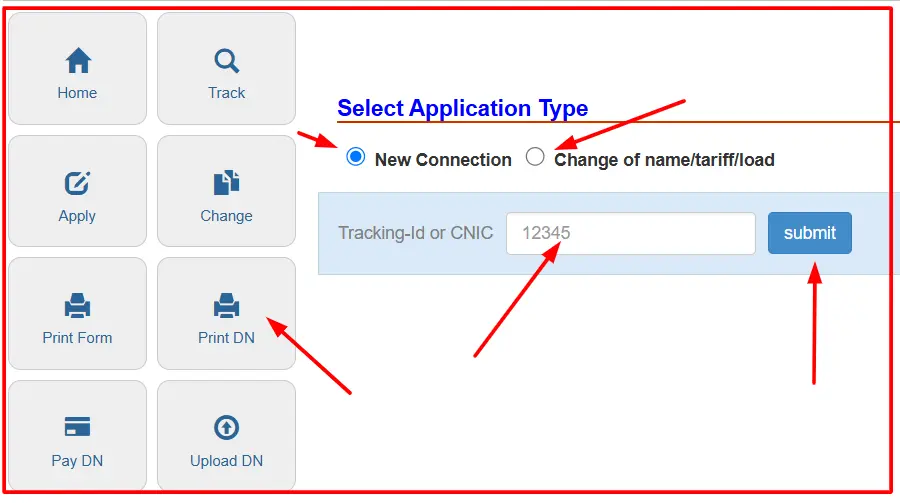
However, once you have downloaded the DN, you need to print it with the help of a printer. I have written all the easy steps below that you need to follow.
How to Print FESCO Demand Notice on Windows?
(ونڈوز پر فیسکو ڈیمانڈ نوٹس پرنٹ کرنے کا طریقہ)
Open the downloaded PDF file.
ڈاؤن لوڈ کی گئی پی ڈی ایف فائل کو کھولیں۔
Right-click on the file and choose “Open with > Adobe Reader” or any PDF viewer.
فائل پر رائٹ کلک کریں اور “Adobe Reader” یا کسی بھی پی ڈی ایف ویوور سے کھولیں۔
After the file opens, press Ctrl + P on your keyboard.
فائل کھلنے کے بعد کی بورڈ سے Ctrl + P دبائیں۔
A print window will open. Choose your printer from the list.
پرنٹ ونڈو کھلے گی۔ فہرست سے اپنا پرنٹر منتخب کریں۔
Click on the “Print” button.
“Print” بٹن پر کلک کریں۔
Wait for a few seconds. Your demand notice will be printed.
کچھ سیکنڈ انتظار کریں، آپ کا ڈیمانڈ نوٹس پرنٹ ہو جائے گا۔
How to Print FESCO Demand Notice on Mac?
(میک پر فیسکو ڈیمانڈ نوٹس پرنٹ کرنے کا طریقہ)
Double-click the downloaded PDF file to open it in Preview.
ڈاؤن لوڈ کی گئی پی ڈی ایف فائل کو دو بار کلک کرکے “Preview” میں کھولیں۔
Go to the top menu and click “File”.
اوپر والے مینو میں “File” پر کلک کریں۔
Now click on “Print” from the drop-down menu.
ڈراپ ڈاؤن مینو میں سے “Print” پر کلک کریں۔
A print settings box will appear. Select your printer.
ایک پرنٹ سیٹنگز باکس ظاہر ہوگا۔ اپنا پرنٹر منتخب کریں۔
You can choose the number of copies or pages if needed.
اگر ضروری ہو تو کاپیوں یا صفحات کی تعداد منتخب کریں۔
Click on the “Print” button at the bottom.
نیچے موجود “Print” بٹن پر کلک کریں۔
Your FESCO demand notice will start printing.
آپ کا فیسکو ڈیمانڈ نوٹس پرنٹ ہونا شروع ہو جائے گا۔
If you need help finding your downloaded file, it’s usually in the Downloads folder.
اگر آپ کو فائل نہ ملے تو یہ عموماً “Downloads” فولڈر میں ہوتی ہے۔






میرا ڈیمنڈ نوٹس نہیں مل رھا ھے.میرا ٹریکنگ نمبر 13432009251 ھے.میری مدد کی جائے